Quick setup: Set your account's default lot selection to Highest Cost First Out (HIFO). At E*TRADE, also keep qualified funds on Actual Cost. Repeat for each account you connect to HarvestEngine.ai.
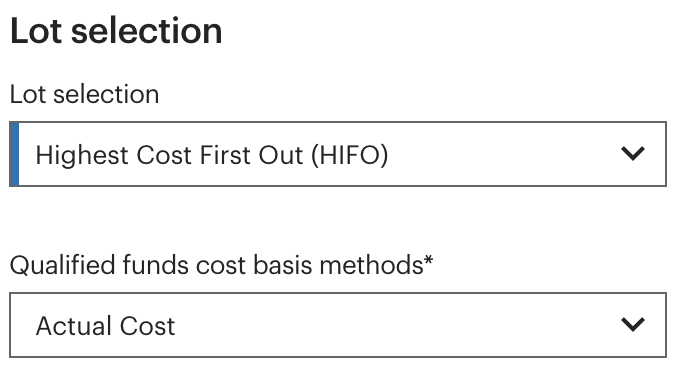
Set the account default
Why use HIFO?
HIFO puts the highest-cost shares first, helping your broker's sales line up with the loss lots HarvestEngine chose.
E*TRADE
- Log in to E*TRADE and open Profile in the upper right.
- Choose Account Preferences.
- Under Cost basis, choose Edit.
- Under Lot selection, select Highest Cost First Out (HIFO).
- In the same dialog, leave Qualified funds cost basis methods set to Actual Cost. If it shows Average cost, change it to Actual Cost.
- Choose Save.
With Actual Cost, ETFs follow your main Lot selection setting: HIFO.
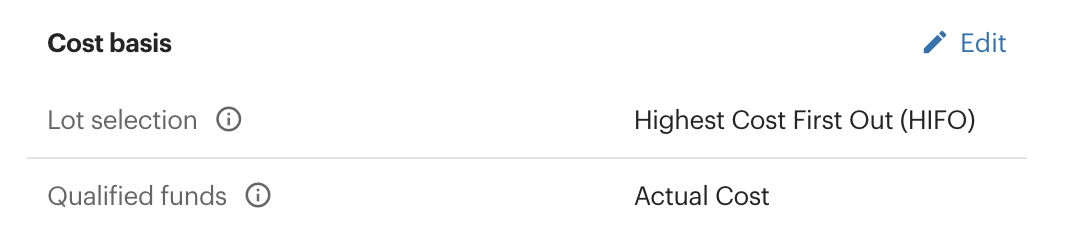
Back on the summary, check that Lot selection reads Highest Cost First Out (HIFO) and Qualified funds reads Actual Cost. Repeat for each account you connect to HarvestEngine.ai.
Schwab
- Log in to Schwab.com and open your account icon in the upper right.
- Choose Account Settings and open the account's cost-basis settings.
- Choose High Cost, Schwab's name for selling the highest-cost shares first, and save your selection.
Fidelity
- Open Fidelity's Change a Cost Basis Tracking Method link and log in.
- For your account, under Default Disposal Method, choose Change.
- Select Highest Cost, then Save.
Vanguard
- Log in to Vanguard. From All accounts, open Portfolio, then Cost basis.
- Select the account and choose View/Change cost basis method.
- Select the holdings and choose Highest in, first out (HIFO).
Apply HIFO to the holdings you use with HarvestEngine and check the setting when you add a new holding.
Vanguard's account-setting steps and HIFO guide.
Place trades at your broker
Schwab, Fidelity and Vanguard connect read-only: you place any trades there yourself. Check the lot selection on your broker's trade ticket before you submit it.
Keep going
For the differences between methods, read Tax-lot selection methods. For the mechanics, read Tax-loss harvesting basics and Cost basis when your broker changes.